
Bitmoji
BitmojiEntertainment
4.5404.62K Reviews
- Version
- 11.83.0.1
- Installs
- 100.00M
- Age Rating
- Teen
Screenshots
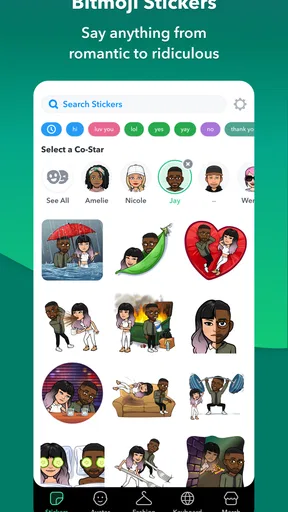
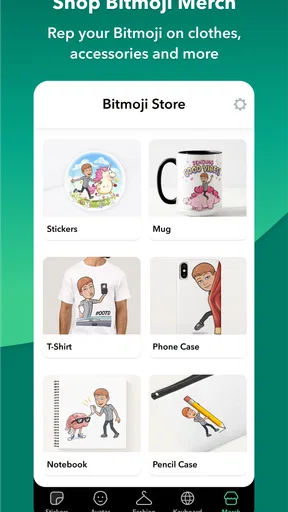
Our Review of Bitmoji
 Analysis by Appyee
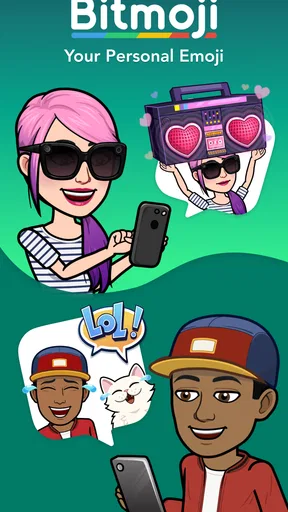
I like Bitmoji best when I treat it as a personal sticker maker rather than a replacement for every emoji. The appeal is simple: I can build a cartoon version of myself, then use it to add a bit of character to everyday chats. That small creative step makes the app feel more personal than picking a standard face from a keyboard, though it also means the fun depends on whether you enjoy customizing an avatar in the first place.
A little personality for ordinary conversations
In practice, the strongest use is not a dramatic one. I might send a reaction after a friend shares good news, soften a quick “I’m running late,” or answer a familiar group chat with a sticker that captures my mood better than a plain text reply. The avatar gives those moments a recognizable voice. It is especially handy with people who already know what your Bitmoji looks like, because the joke or expression can land without needing an explanation.
That does not make it a universal communication tool. A sticker can make a casual exchange warmer, but it is a poor substitute for a clear answer when someone needs details. I would not use a cartoon reaction to explain a schedule change or settle a misunderstanding. My rule is to use it as punctuation: a quick visual accent after the useful words, not a replacement for them.
Who gets the most out of it
The app suits people who send lots of informal messages and enjoy putting a little of their own style into them. It is also a natural fit for Snapchat users, since the avatar has a more obvious role there than it does in a chat app where most friends prefer plain text. If your conversations are mostly with people who recognize your character, the recurring visual identity can make your messages feel distinctly yours.
I would skip it if you rarely use stickers, prefer a minimal keyboard, or do not want to spend time making and maintaining a cartoon likeness. It is also not the best choice when you need a broad library of general-purpose reactions rather than one recurring avatar. Standard emoji are quicker, easier to scan, and more consistent across platforms; Bitmoji is more expressive in a personal way, but that trade-off only matters if you enjoy seeing your own character show up.
A realistic day-to-day test
Picture a busy weekday: a friend asks whether you can meet after work, you are still dealing with errands, and the group chat is already trading jokes. I would answer the practical question in text, then use a Bitmoji reaction to keep the exchange light. Later, when someone posts a celebratory update, a matching avatar sticker can add warmth without making me compose a whole response. That is where the app earns its place: small, low-pressure moments where tone matters and a familiar face is fun.
A useful habit is to think about the recipient before opening the keyboard. If they know the character and enjoy stickers, it can make a message feel more like you. If they do not use Bitmoji, or the conversation is formal, the extra image may be distracting. The same sticker can read as playful to one friend and unnecessary to another, so I treat it as a social choice rather than an automatic default.
How it compares with ordinary emoji and stickers
Compared with the standard emoji built into a phone keyboard, Bitmoji offers a more consistent personal identity: the expressions and scenes center on your avatar rather than a general symbol. Compared with sticker packs, its advantage is that the character is meant to represent you, not a collection of unrelated mascots. The downside is just as clear: generic emoji are faster to find and work almost everywhere, while a personal avatar can feel repetitive if you use it for every reaction.
That difference helps me decide which tool to reach for. I use ordinary emoji for quick, universal signals such as a simple acknowledgement. I reach for Bitmoji when I want a reaction with more personality or a visual joke that fits the conversation. If the recipient’s app does not make sticker sharing convenient, plain text or a standard emoji is the safer choice. Bitmoji works best as one option in a messaging toolkit, not as a reason to abandon the others.
Small workflow choices that make it easier
Avatar setup is the part worth doing carefully, because the whole idea depends on recognizing yourself in the result. I would begin with the features friends are most likely to notice—hair, face shape, and a familiar outfit—rather than trying to perfect every detail at once. If the first version feels close enough, I can use it immediately and adjust it later instead of turning setup into a long project.
The keyboard route is convenient when I want to add a sticker without leaving a conversation, but it is not the only way I think about using the app. For a message that needs careful wording, I compose the text first and add an avatar only if it improves the tone. That order avoids the common trap of letting the sticker become the message. It also makes it easier to decide whether a personal image is suitable for a work chat, a new acquaintance, or a conversation where clarity matters more than playfulness.
Another practical trade-off is consistency. A recognizable avatar can become a familiar signature, but changing its appearance too often may make the character feel less like a stable representation of you. I would update it when my style changes or when I simply want a fresh look, not because every available option needs to be tried. The point is not to build a perfect portrait; it is to make a character that feels comfortable to send.
Getting Started with Bitmoji
First things first, downloading the app is a breeze. Available on both Android and iOS, just head over to your app store and search for Bitmoji. Once installed, you're greeted with a straightforward setup process. You can either log in with Snapchat (since it's now part of the Snap Inc. family) or create an account with your email. I went with the Snapchat option because, let's face it, who doesn't like a seamless integration?
Creating Your Avatar
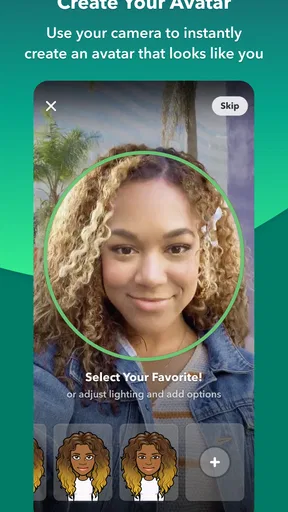
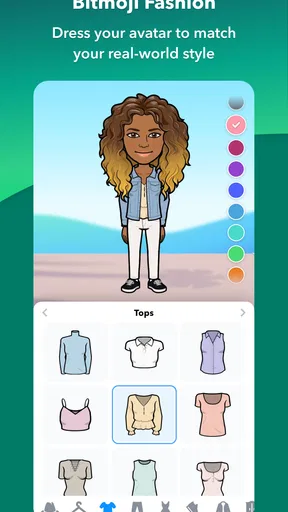
Now, this is where the magic happens. The avatar creation process is incredibly detailed. You start with the basics like gender and skin tone. Then, you move on to customizing facial features: eyes, hairstyle, eyebrows—everything! I was amazed by the level of detail available. You can even tweak your outfit to fit your personal style. It's like playing dress-up but for grown-ups. By the end of it, I felt like I was looking at a cartoon version of myself!
The Bitmoji Keyboard
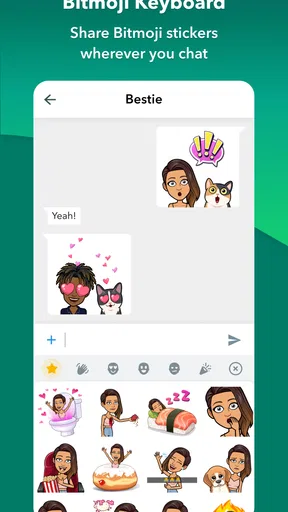
Once your avatar is ready, the app prompts you to enable the Bitmoji keyboard. This allows you to use your creations across a wide range of apps, from WhatsApp to iMessage. Setting it up is simple, and once activated, you have a world of personalized emojis at your fingertips. I found it super fun to send a Bitmoji of myself feeling "meh" to friends instead of the usual thumbs-down emoji.
Integration with Snapchat
If you're a Snapchat user, you're in for a treat. Bitmoji works seamlessly with Snapchat, allowing you to use your avatar in snaps and stories. The coolest feature has to be the friendmoji, where you can create joint avatars with your friends. It's hilarious seeing my avatar hanging out with my best friend's avatar in a virtual world. It's like having a mini version of us on screen!
Exploring Bitmoji Deluxe
A couple of updates back, Bitmoji introduced something called "Bitmoji Deluxe." This update brought in a ton of new customization options, including more hairstyles, accessories, and even the ability to add makeup. The level of personalization is impressive, and it feels like there's no end to how unique you can make your avatar. I spent a ridiculous amount of time tweaking my avatar, and it was worth every second.
Why You'll Love It
So, why should you download Bitmoji? For starters, it's a great way to express yourself in a digital world. Texts can sometimes come off as cold or impersonal, and having a fun avatar adds a layer of personality and warmth. Plus, it's a conversation starter—trust me, your friends will want to know how you created that cool lil’ avatar.
Another thing I love is the constant updates. The developers are always adding new features and content, so it never feels stale. Whether it's seasonal outfits or new hairstyles, there's always something fresh to try. It's like your avatar has its own fashion line!
What to expect from the app itself
Beyond the creative side, it helps to know what kind of commitment this is. Bitmoji is a free entertainment app from Bitmoji, rated Teen, and its current version is 11.83.0.1, with Android 5.0 as the minimum operating system. That makes it accessible to many Android users, while its availability on iOS gives people using either major phone platform a way to create the same kind of avatar-based messages. It has a 4.5 average from around 3.6 million ratings and more than 100 million installs, which suggests that the format has broad appeal, though popularity alone cannot tell you whether you will enjoy using it day to day.
The practical question I would ask before installing is whether you want an app that creates a character for use in other conversations, rather than a messaging service with its own social purpose. Bitmoji is at its most useful when it fits into chats you already have. You do not need to make every conversation about your avatar, and you do not need to convince friends to change how they communicate. Start with one or two stickers in a casual thread and see whether they feel natural. If they do, the app has a clear role; if they feel like clutter, there is little reason to force it into your routine.
When the playful approach can fall short
The same personal quality that makes the stickers appealing can narrow their usefulness. An avatar is not a neutral symbol: it represents a version of you, and its expressions may not match the mood you mean to convey. A laughing character can seem flippant when someone is sharing a serious problem, while a dramatic reaction can feel overdone in a simple exchange. I would choose the words first in sensitive conversations, then leave the sticker out unless I am sure it adds care rather than noise.
There is also a small but real setup cost. Making a character that feels recognizable takes attention, and the range of choices can turn a quick task into a stretch of tinkering. That is enjoyable if customization is the point, but less attractive if you just want one funny reaction and do not care about building a likeness. The more time I spend adjusting details, the more I have to ask whether the result changes how I actually communicate. For a casual user, a few deliberate choices are usually more useful than trying to explore every option.
Keyboard access is another choice rather than a requirement. It can speed up sending a sticker, but some people prefer to keep their usual keyboard uncluttered and open the app only when they want a specific image. I would choose the workflow that feels comfortable instead of enabling a feature simply because the app recommends it. If you share a device or have preferences about what appears in your typing tools, that extra convenience may not be worth the change to your routine.
Making the choice with a clear expectation
For a first try, I would make a simple avatar, send a sticker to a friend who already enjoys visual reactions, and pay attention to whether it feels like a natural extension of your voice. That is a better test than judging the app by the number of customization choices or by how amusing the first few stickers look. If the character helps you express a tone you otherwise struggle to convey, keep it in your chat routine. If you find yourself searching for a sticker when a short sentence would be clearer, use the sentence and leave the avatar for another moment.
Bitmoji is free, so trying it does not require a purchase, but its real cost is attention: setup time and a little extra thought about when an avatar belongs in a conversation. I see it as a focused companion to standard emoji and stickers, with its own strength in making reactions feel personally recognizable. People who like visual humor, use Snapchat, or want a cartoon signature for casual chats are the clearest audience. People who value speed, prefer plain text, or rarely send stickers can comfortably skip it without missing an essential messaging feature.
Final Thoughts
All in all, Bitmoji is more than just an app—it's a way to bring a little bit of yourself into every digital interaction. It's easy to use, endlessly customizable, and just plain fun. If you haven't tried it yet, what are you waiting for? It's time to upgrade those emojis and let your avatar do the talking!
Verdict
Strengths of Bitmoji
- Custom avatars are highly customizable.
- Integrates smoothly with Snapchat.
- Wide range of expressive stickers.
- Easy to use and intuitive interface.
- Regular updates with new features.
Limitations of Bitmoji
- Limited offline functionality.
- Some features require Snapchat.
- Privacy concerns with data usage.
- Can be slow on older devices.
- Offers in-app purchases for extras.
Similar Picks in This Category
View All
Google Play Games
Google LLC3.9

Netflix
Netflix, Inc.4.8

YouTube Kids
Google LLC4.2

Disney+
Disney4.4

Prime Video
Amazon Mobile LLC4.7

Steam
Valve Corporation3.2
Frequently Asked Questions
What is Bitmoji and how does it work?
Bitmoji is a personalized emoji app that allows users to create custom avatars representing themselves. Once you've designed your avatar, Bitmoji integrates with various social media platforms, letting you use your avatar in chat messages, stories, and more. The app provides a vast library of stickers featuring your avatar in different scenarios and expressions.
Is Bitmoji free to use, or does it require a subscription?
Bitmoji is free to download and use. While the app offers a wide range of customization options and stickers at no cost, it does not currently include in-app purchases or a subscription model. Users can enjoy all features without any hidden fees or costs.
What platforms are compatible with Bitmoji?
Bitmoji is available on both Android and iOS devices, making it accessible to a wide range of smartphone users. Additionally, Bitmoji can be integrated with platforms like Snapchat and other social media services, allowing users to easily share their personalized emojis across various apps.
How does Bitmoji ensure user privacy and data security?
Bitmoji takes user privacy seriously by adhering to strict privacy policies. The app collects minimal personal data, primarily necessary to create and store your avatar. It does not sell user data to third parties. Users should review the privacy policy for detailed information on data handling practices.
Can I customize my Bitmoji avatar after creating it?
Yes, Bitmoji allows users to continuously customize their avatars even after the initial creation. You can change hairstyles, outfits, and facial features anytime through the app’s avatar editor. This flexibility ensures your Bitmoji can evolve with your style or mood changes.
